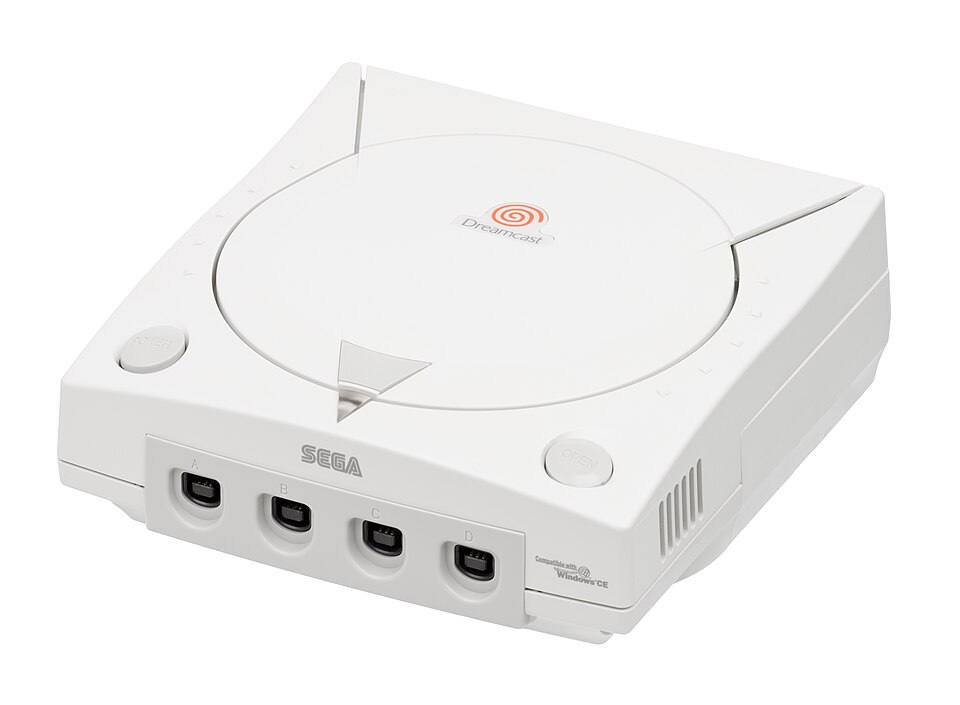

A console ahead of its moment
The Dreamcast is SEGA’s final home console and the successor to the Saturn. It brought fast arcade games, a modem and a memory card with its own screen into one compact machine. Its commercial life was brief, but its ideas — connected play, downloadable extras and a more social living room — helped define what came next.
Released in Japan on 27 November 1998, it reached North America on 9 September 1999 and Europe on 14 October 1999. For Dutch collectors, the European PAL edition is the local reference point. Japanese and North American releases open up different libraries, packaging and hardware variants.
From the Saturn to a new beginning
SEGA entered the Dreamcast era after the Saturn had struggled to build a broad audience outside Japan. The new machine took a different technical direction: a Hitachi SH-4 processor and PowerVR graphics formed a relatively focused architecture, while SEGA’s NAOMI arcade hardware shared important technology with it. The two were related platforms, not interchangeable machines.
The Japanese launch began the story in 1998; the heavily promoted 9/9/99 North American launch made the console a recognisable cultural moment. Sonic Adventure provided a new 3D showcase, while arcade conversions gave the library an immediate identity. In Europe, Dreamcast also introduced many players to online services through Dreamarena.
The following years produced unusually adventurous software, from Shenmue’s everyday city life to Jet Set Radio’s cel-shaded streets and Phantasy Star Online’s cooperative expeditions. In January 2001, SEGA announced its withdrawal from the home-console hardware business. Production ended in 2001, but that did not mean all software releases or online services stopped on the same day.
SEGA continued as a software publisher for other platforms. Dreamcast releases continued for years in Japan, and independent developers later extended its life. Treat claims about the ‘last Dreamcast game’ carefully: the answer depends on whether you mean a region’s final licensed release, a SEGA-published title or a modern independent production.
Under the lid
A 200 MHz Hitachi SH-4 CPU works alongside a PowerVR2 graphics processor. The console has 16 MB of main memory, 8 MB for graphics and 2 MB for its Yamaha AICA audio system. That audio hardware supports 64 PCM channels. The often-used ‘128-bit’ label is period marketing, not a useful single-number comparison with other consoles.
Games normally arrive on GD-ROM, SEGA’s high-density optical format. It is different from DVD: the Dreamcast is not a DVD movie player. The drive can also play audio CDs. Four controller ports are built into the front, making local multiplayer possible without a separate multitap.
The standard controller combines an analogue stick, directional pad, four face buttons, Start and two analogue triggers. Two expansion slots accept a VMU or compatible accessories. There is no second analogue stick, so camera controls in older 3D games can feel unfamiliar today.
The removable modem varies by region and model, commonly 33.6 or 56 kbit/s. A Broadband Adapter is a separate accessory; owning one does not automatically make every online game compatible. The serial and AV connectors serve different purposes and should not be confused with modern USB or HDMI.
The VMU and the wonderfully unusual accessories
The Visual Memory Unit, or VMU, is a memory card with an LCD, buttons and a small speaker. Connected to a controller, it can display game-specific information; removed, it can run supported mini-games. A standard VMU offers 200 user-accessible save blocks. Some games need substantial space, so check their requirements before starting.
The VMU’s coin cells power its standalone functions. A depleted pair does not by itself erase stored saves, and the VMU receives power from the controller when attached. Keep backup saves where possible; old memory hardware can still fail independently of its batteries.
The accessory library reflects SEGA’s arcade roots: arcade sticks, a fishing controller, steering wheels, light guns, keyboards, mice, microphones and Samba de Amigo maracas. Support is game-specific. Traditional Dreamcast light guns are designed around CRT displays and are not a straightforward fit for a modern flat panel.
Regions, editions and hardware revisions
PAL European systems are associated with a blue swirl; Japanese and North American branding uses an orange-red swirl. Regional releases differ in video modes, packaging, languages and software compatibility. Do not assume an imported disc will boot on an unmodified local console.
The hardware is commonly grouped into VA0, VA1 and VA2 revisions. Changes affect the optical drive and compatibility with replacement hardware. A case label is useful evidence, but replacement shells and repairs can make it misleading: check the actual board and the accessory manufacturer’s compatibility instructions before ordering a modification.
MIL-CD support also varies, particularly among late machines. Being able to play an audio CD does not prove that a console can boot a homebrew CD. Limited editions and recoloured shells need extra scrutiny: a modern replacement shell is not the same as a documented original special edition.
For imports, verify the rated mains voltage on the unit. A plug adapter changes the shape of a plug, not the electrical voltage. Keep original model numbers and any modification history in your collection notes.
A library with its own personality
Dreamcast’s appeal is less about a single genre than the contrast between immediate arcade play and experiments that demanded a slower pace. Crazy Taxi and The House of the Dead 2 bring short-session arcade design home. Sonic Adventure and its sequel explore 3D platforming, while Shenmue spends time on routines, conversations and a detailed place.
Jet Set Radio uses stylised outlines and music to give its streets a distinct identity. Skies of Arcadia builds a traditional role-playing adventure around airships and exploration. Phantasy Star Online puts cooperative action and character progression at the centre of an online console game.
The selection below is a starting point, not a complete release database or a ranking. Release years and names vary by territory; Jet Set Radio, for example, was called Jet Grind Radio in North America. Check the exact regional edition when buying, especially for language, VGA support, save requirements and online features.
Sonic Adventure
Six perspectives on Sonic’s leap into a larger 3D world, with Chao raising on the side.
Track in my collection +01Shenmue
A revenge story told through exploration, conversations and the routines of a Japanese town.
Track in my collection +02Jet Set Radio
Graffiti, skating and an unmistakable cel-shaded style. Known as Jet Grind Radio in North America.
Track in my collection +03Crazy Taxi
Pick up passengers and chase the clock. An immediate introduction to SEGA’s arcade design.
Track in my collection +04Phantasy Star Online
Cooperative expeditions and character progression. Check community server and version requirements.
Track in my collection +05Skies of Arcadia
Air pirates, turn-based battles and exploration above the clouds.
Track in my collection +06ChuChu Rocket!
Guide mice with directional arrows while rivals interfere. Fast, chaotic puzzle competition.
Track in my collection +07The House of the Dead 2
A branching arcade shooting game. Original light guns need an appropriate CRT setup.
Track in my collection +08Samba de Amigo
Match the music with maracas. Check accessory compatibility before assembling a set.
Track in my collection +09Sonic Adventure 2
Hero and Dark stories mix high-speed stages, treasure hunting and shooting.
Track in my collection +10Playing on a television today
Dreamcast can output composite, S-video, RGB and VGA through suitable hardware. VGA uses 31 kHz RGBHV and commonly provides a sharp 480p picture in compatible games. Support is not universal, so an adapter advertised as ‘HDMI for Dreamcast’ may still depend on whether the game supports VGA.
A modern display usually needs a suitable converter or scaler. Check which input modes a device actually handles, whether it adds latency and whether audio is included. A passive cable cannot simply turn analogue video into digital HDMI.
PAL releases may offer 50 Hz or 60 Hz choices, but this varies by game and display setup. For a collection mixing territories or non-VGA games, plan for the whole library rather than testing only one title. CRT setups remain useful for original light-gun games and period video behaviour.
Online play: then and now
The included modem made network features part of the Dreamcast’s identity. Original services and servers changed or closed over time. Today’s restored services are community projects and should not be mistaken for continuing official SEGA support.
Dreamcast Live maintains connection instructions and a game-by-game status list. DreamPi bridges compatible modem hardware to a modern internet connection; the Broadband Adapter offers a different route for a smaller supported set of games. Equipment and setup requirements differ, so begin with the current guide for your chosen game.
A game having an online menu does not guarantee that its multiplayer, rankings, downloads and web content all work today. Check the status list before buying equipment and arrange a session through the community when player numbers are low. This article was reviewed on 5 September 2026; linked service lists remain the better source for live availability.
Homebrew, preservation and emulation
Independent development continues beyond the original commercial catalogue. KallistiOS provides an open-source development environment for Dreamcast projects, supporting a scene that includes games, tools and ports. Modern independent releases should be catalogued separately from the original licensed library.
Flycast is an actively maintained emulator project covering Dreamcast and related arcade systems. Its documentation is the starting point for supported platforms and configuration; compatibility and performance depend on the game, emulator version and host device. An emulator does not make every accessory or network feature behave exactly like original hardware.
Optical-drive emulators replace the physical drive with solid-state storage on supported hardware. They can reduce dependence on ageing mechanisms, but compatibility is revision-specific and an installation changes the original machine. Record the board revision, replacement hardware and firmware alongside your console. Preserve original parts and your own save data where practical.
Building a collection that makes sense
Start with how you want to play: a few favourites, the European library, a specific genre or unusual accessories. A console, working controller, tested video connection and a VMU are a more useful first setup than an untested bundle with impressive packaging.
Ask for a cold-start demonstration, reliable disc loading, working controller ports and a successful save-and-load test. Check hinges, ports, the fan and included cables. Note cosmetic yellowing separately from functional problems. For multi-disc games, verify that every disc is present and matches the edition.
European cases are distinctive and can be fragile. Inspect hinges, disc trays, manuals and rear inserts, and distinguish replacement parts from originals. Japanese spine cards and registration extras may matter to some collectors, but they are not necessary to play.
There is no fixed ‘Dreamcast value’. Region, condition, completeness and modifications all affect comparable sales. Compare recently completed sales for the same edition rather than treating an asking price as a realised value. In RetroVita, you can keep your own owned and wanted items with region, condition and personal notes.
Care, faults and long-term storage
Keep consoles and discs dry, away from direct sun and with ventilation unobstructed during use. Store discs in cases and handle them by the edges. Back up important saves before experimenting with replacement storage, firmware or unfamiliar utilities.
Repeated resets, read failures and lost clock settings are symptoms, not diagnoses. A worn drive, poor contact or power-related fault can present similarly. Avoid turning laser adjustment controls at random: a console that struggles to read a disc needs diagnosis before calibration.
The internal clock battery is rechargeable in the original design. It should not be replaced blindly with an ordinary non-rechargeable coin cell. Mains-powered internals and battery modifications belong with someone who understands the circuit; unplugging a unit is not a repair procedure. Record repairs and replaced parts so the next owner knows its history.
Frequently asked questions
Does Dreamcast play Saturn games? No. Original Saturn discs do not work as native Dreamcast games. Does it play DVD films? No; GD-ROM is a different format.
Can I play without a VMU? Many games will start, but you will usually need compatible memory storage to keep progress. Check the individual game’s requirements; the VMU’s screen and mini-games are separate features from its save storage.
Is every Dreamcast game playable online? No. Only some games had online features, and restored services differ. Is every game VGA-compatible? Also no. Check the exact regional release and the current community compatibility information.
Are there still new games? Independent developers continue to work on the platform. That is a different category from new official SEGA hardware or the original licensed catalogue. Is this wiki complete? It is a broad introduction with routes into specialist references; a complete catalogue of every regional release and repair variation is a much larger project.
Sources & editorial notes
An independently written introduction. SEGA’s archive documents original hardware and Japanese releases; community projects document modern support. The collecting and care checklists are editorial guidance, not technical repair manuals. External references are generally in English or Japanese.
- [1] SEGA — Dreamcast hardware archive ↗
- [2] SEGA — Japanese software catalogue ↗
- [3] Dreamcast development wiki — hardware ↗
- [4] Dreamcast development wiki — revisions ↗
- [5] Dreamcast development wiki — video output ↗
- [6] Dreamcast Live — connection guide ↗
- [7] Dreamcast Live — online game status ↗
- [8] KallistiOS — homebrew development kit ↗
- [9] Flycast — emulator project ↗
- [10] SEGA — NAOMI and the arcade connection ↗
- [11] Dreamcast launch reporting — CBS, 9 September 1999 ↗
- [12] European launch archive — Dreamcast Info ↗